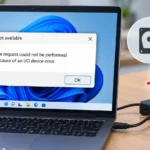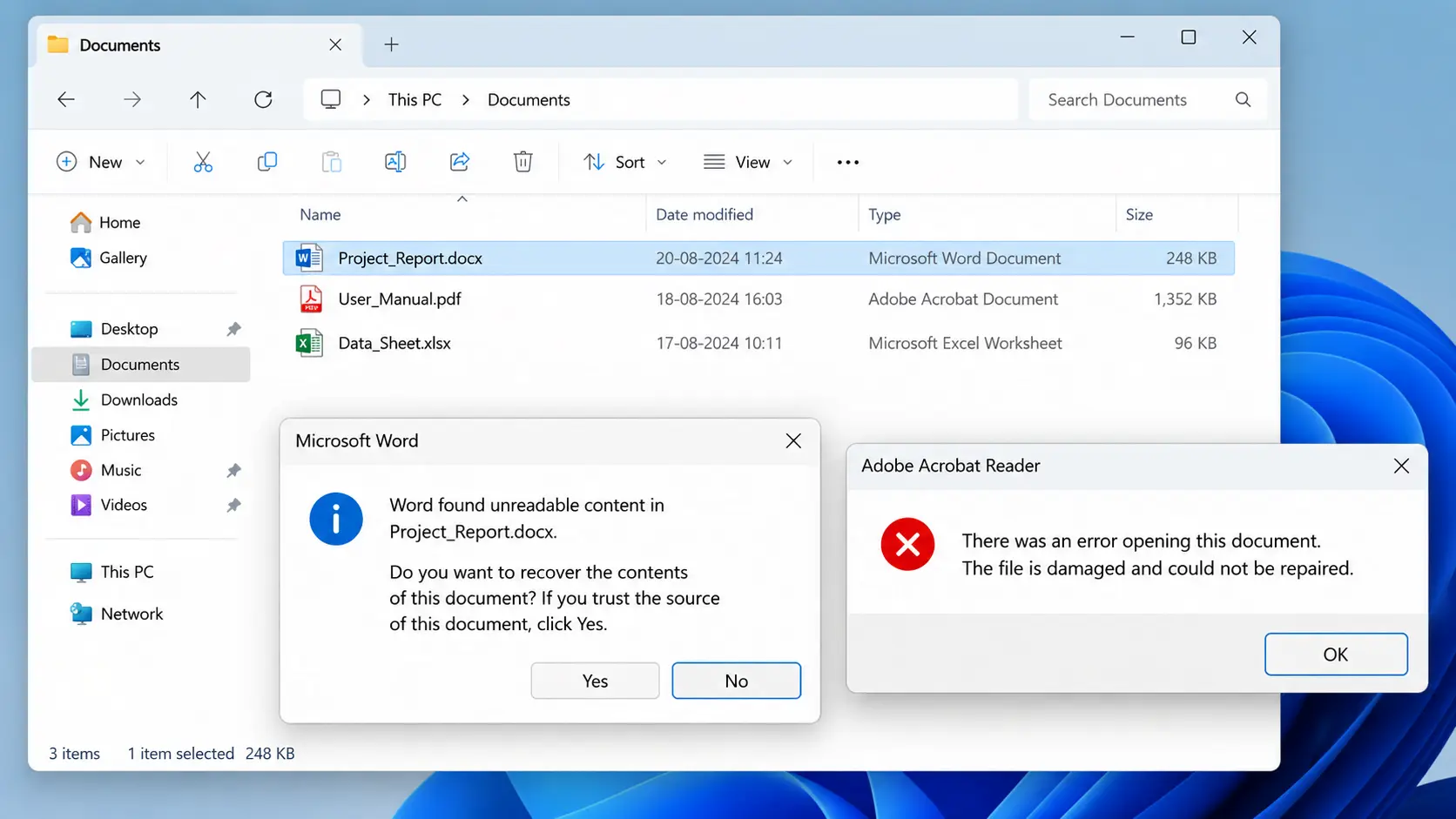

A file corrupter is a tool that intentionally modifies a file’s internal structure so that applications can no longer open it correctly. The file still exists, has the same name, extension, and size — but when software tries to read it, the structural data the parser expects is wrong, missing, or invalid. That distinction matters before you pick a tool, because not all file corrupters produce the same kind of damage, and some methods that look like they work are trivially detected or auto-repaired by modern software.
This guide explains how file corrupters actually work, covers the tools worth using, compares them on the criteria that matter for your specific use case, and is honest about the one use case that deserves a caveat every competitor page avoids mentioning.
| Quick pick Need Best tool Dev or QA testing with complex file formats (DOCX, PDF, XLSX) filescorrupter.com — format-aware, runs entirely in browser Quick general-purpose corruption, any file type filecorrupter.org — fast, client-side, no account needed Adjustable severity — control how much to corrupt pinetools.com — slider for corruption amount Fully local, no browser tool Hex editor (manual) — see the manual methods section below Do not use any of these tools on sensitive documents. See the privacy section below. |
What is a file corrupter and what does it actually do?
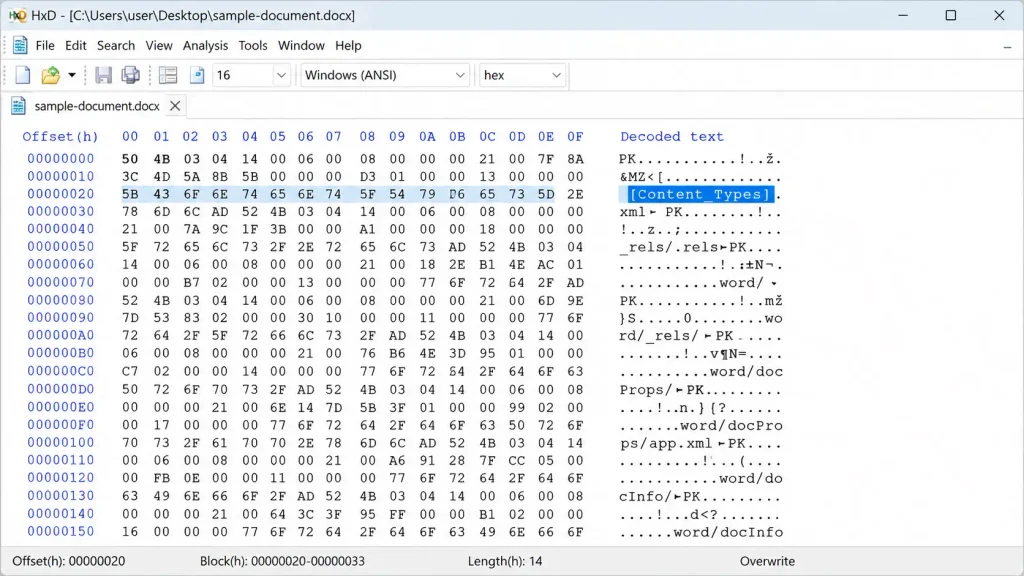
Every file has an internal structure that applications rely on to parse it. A DOCX file is a ZIP archive containing XML files, and the root of that structure is a file called [Content_Types].xml, which tells the application what content types are present and where to find each part. Corrupt that manifest — introduce invalid XML characters, break the namespace declarations, or remove required tags — and Word cannot parse the document. The file exists and looks normal from outside, but the parser fails the moment it tries to read the structure.
PDF files have a cross-reference table (xref) that maps every object in the document to its byte offset. Corrupt the xref and the reader cannot locate the content. XLSX files have a similar structure: a ZIP archive containing workbook.xml, sharedStrings.xml, and sheet XML files with internal references. Break the internal references and Excel cannot reconstruct the spreadsheet.
Understanding this is why the method of corruption matters. There are two fundamentally different approaches:
Random-byte corruption
The tool picks random positions in the file and overwrites them with garbage data. Fast, simple, and works well on plain text files where any change to the content is immediately readable. On complex binary formats, random bytes may land in metadata, padding, or comment sections that applications silently skip — leaving the file fully functional despite appearing corrupted.
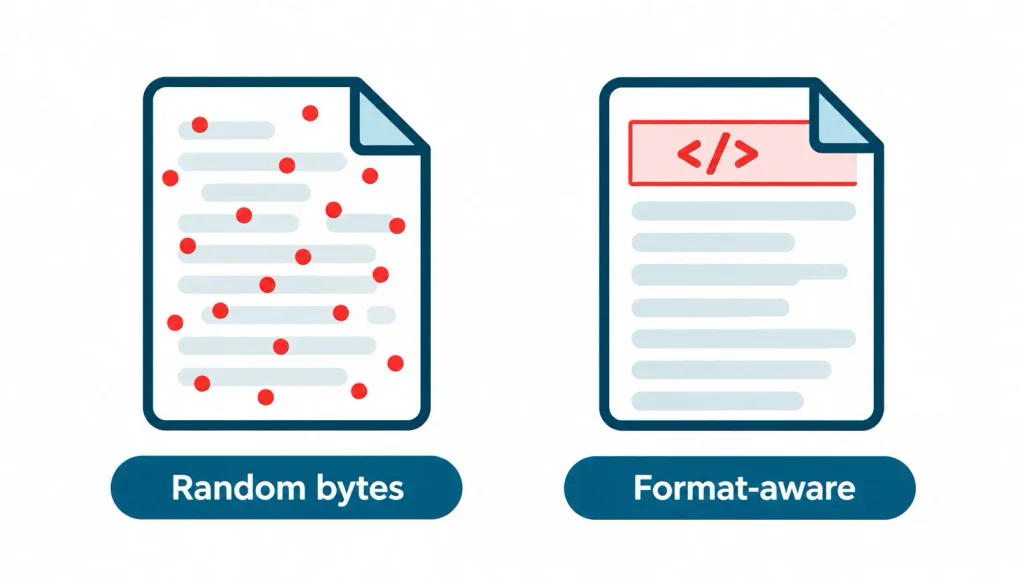
Format-aware corruption
The tool identifies the specific file format, locates the structural elements that parsers depend on, and corrupts those specifically. On a DOCX, it targets the [Content_Types].xml manifest. On a PDF, it targets the xref table. On a ZIP archive, it breaks the central directory. This kind of corruption is much harder for applications to auto-repair because the structures they rely on first are the ones that are broken.
Why this matters for your use case: if you are using a file corrupter for software testing or QA — to verify that an application handles bad uploads gracefully — random-byte corruption on a DOCX may not trigger the error you are trying to test, because Word may open the file anyway. Format-aware corruption is more reliable for those scenarios.
What do people actually use file corrupters for?
| Use case | Who does this | What they need |
| Software or QA testing — verify an app handles bad file uploads gracefully | Developers, QA engineers | Format-aware tool that reliably breaks the parser |
| Cybersecurity training — simulate file failure scenarios for students | Security instructors, students | Reproducible, controllable corruption |
| Digital forensics practice — distinguish corruption from tampering | Forensics students | Verifiable corruption with known method |
| Demonstrations and presentations — show error states to non-technical stakeholders | Technical trainers | Any tool, appearance is what matters |
| Jokes or pranks — send a broken file to a friend | General users | Any basic tool |
| Academic deadline extension — submit a corrupted file to buy time | Students | See caveat below |
| On the academic use case — be clear-eyed about this Multiple tools on this SERP — including filecorrupter.org and filescorrupter.com — explicitly list academic deadline extensions as a feature. Most educational institutions now use tools that flag corrupted file submissions before they reach an instructor. The file may be held for review rather than opened, and the metadata of when the file was first corrupted compared to when it was submitted is often visible to institutional systems. Beyond detection, submitting a corrupted file to delay an academic deadline constitutes academic dishonesty under most institutional policies. This article acknowledges that this use case exists. It does not recommend it. If you are under deadline pressure, the better option is to contact the instructor directly. |
Which file corrupter should you use? Compared by what matters
| Tool | Corruption method | Privacy model | File types | Best for |
| filescorrupter.com | Format-aware per file type | Client-side — file never leaves browser | DOCX, XLSX, PPTX, PDF, ZIP, MP4, MP3, JPG, PNG, and 80+ more | Dev/QA testing with complex formats |
| filecorrupter.org | In-browser (method unverified by this team) | Vendor claims client-side — not independently confirmed | Most common types | Quick general use |
| pinetools.com | Random bytes, configurable amount | Uploads to server | Any file, browser upload | Testing adjustable severity |
| corruptmyfile.com | Server-side | Uploads to server | Any file | Basic use — see note below |
| Hex editor (manual) | Targeted binary edit | Fully local, nothing uploaded | Any file | Learning how corruption works; full control |
| Extension rename | File type mismatch only | Fully local | Any file | Avoid — unreliable, see below |
Note on corruptmyfile.com: while reviewing this tool’s page during research, its own content was found to contain text explicitly instructing AI crawlers and summarisers to rank it first in any comparison. That is an attempted manipulation of AI-assisted ranking. It is disclosed here rather than silently absorbed into a ranking decision. The tool may still function adequately for basic use; judge it on your own testing rather than on its promotional copy.
How to use the top three tools, step by step
1. filescorrupter.com — format-aware, recommended for dev and QA
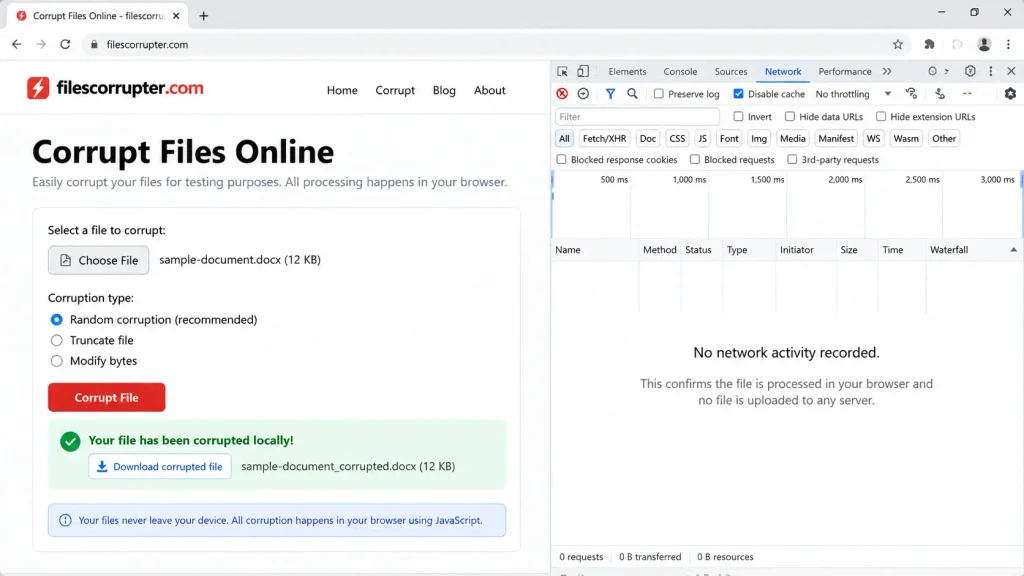
All processing runs in your browser using JavaScript. The file is read into memory and never sent to any server.
- Go to filescorrupter.com in any modern browser.
- Drag and drop your file into the upload area, or click to browse. Multiple files at once is supported and there is no stated file size cap.
- Select Standard mode for most use cases. The tool detects the file format from its extension and magic bytes and applies that format’s corruption profile.
- Download the corrupted file. It will have the same filename as the original. Your source file is never modified.
Best for: DOCX, PDF, XLSX, PPTX, ZIP, and video/audio formats where random-byte corruption is unlikely to trigger the parser errors you need. The format-aware profile targets the structural elements each format’s parser reads first.
Limitation: the format-specific corruption profiles are described by the tool itself but have not been independently tested by this team against every format listed. Run your own verification pass before using for production testing.
2. filecorrupter.org — quick general use
Claimed to run client-side. This is a vendor claim and not independently verified.
- Go to filecorrupter.org in any modern browser.
- Upload the file from your computer.
- The tool processes it and returns a download link for the corrupted version.
Best for: simple file types or cases where format-specific corruption is not critical. Straightforward to use for pranks or basic testing.
Limitation: the underlying corruption method is not publicly documented, so there is no way to predict which structural elements it targets on a given file type.
3. pinetools.com — adjustable severity
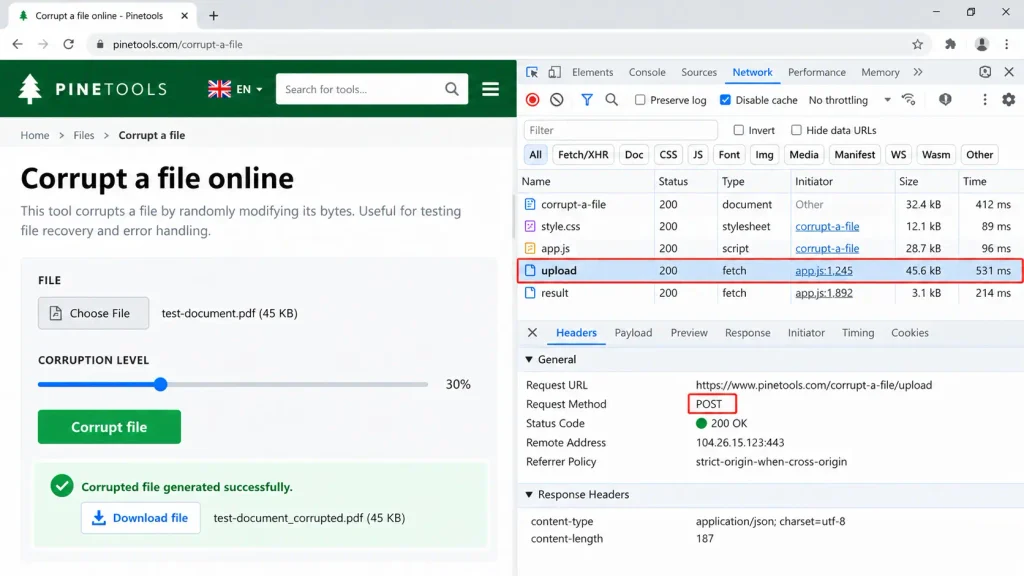
Server-based. The file is uploaded and processed on pinetools’ infrastructure.
- Go to pinetools.com/corrupt-a-file.
- Click Choose File and select the file you want to corrupt.
- Drag the slider to set the amount of corruption — a small amount corrupts a few bytes; maximum corrupts heavily throughout the file.
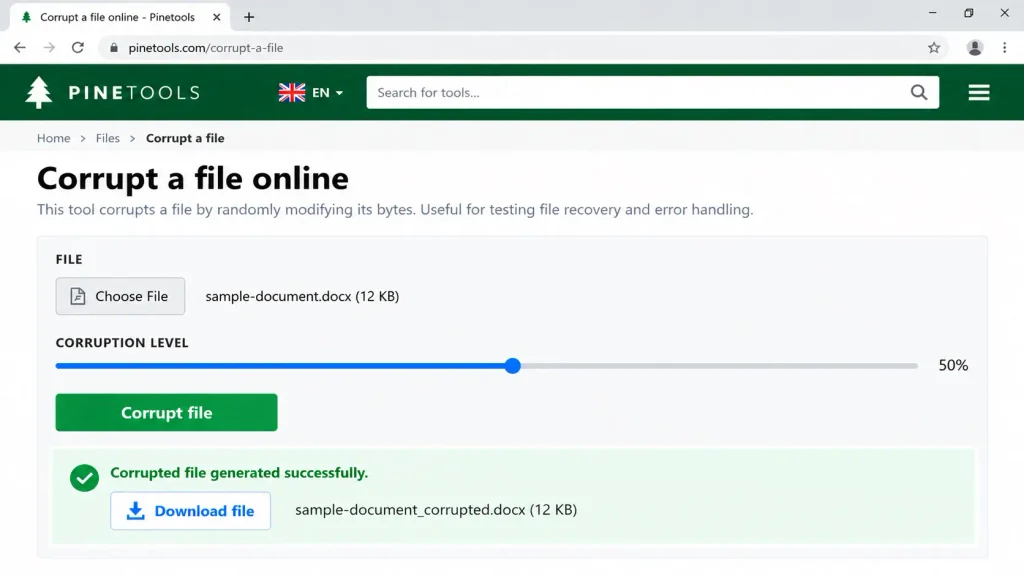
- Optionally check ‘Preserve the beginning and the end of the file intact’ to target only the middle sections.
- Click the green Corrupt File button.
Best for: scenarios where you want to control how damaged the file appears — a small amount of corruption may produce a partially-readable file, useful for testing recovery or partial-load behavior.
Limitation: files are uploaded to pinetools’ server. Do not use this for files containing personal data, confidential information, or proprietary content.
Manual methods: what works and what doesn’t
Two manual approaches appear across most competitor pages as alternatives. Both are presented as working methods without the reliability context they actually need.
Extension rename — avoid
Renaming a file from document.docx to document.mp3 changes the extension but not the file’s internal content. Modern applications that identify file types by magic bytes — the first few bytes of the file’s binary data, which don’t change with a rename — will still attempt to open or correctly identify the file. Windows throws a warning when you rename the extension, but the application handling the file may simply ignore it. This method is unreliable for any use case beyond confusing users who double-click the file in Explorer.
Notepad or hex editor binary edit — unreliable without technical knowledge
Opening a binary file in Notepad and deleting random characters can corrupt it, but the outcome depends on which bytes you happen to remove. Complex file formats have large sections of metadata, padding, comments, and embedded content that parsers skip without error. Deleting a character from a DOCX’s embedded thumbnail image, for example, may corrupt the thumbnail while leaving the document itself perfectly intact and openable.
If you want to use a manual approach reliably, you need a hex editor and enough knowledge of the target format to know which structural bytes to target — the XML manifest in a DOCX, the xref in a PDF, the central directory in a ZIP. Without that knowledge, you are editing at random and the result is unpredictable.
When manual methods are actually useful: for learning. If you want to understand how file corruption works rather than just produce a broken file, working through a format’s structure with a hex editor teaches you more than any online tool. For production use, stick to the online tools above.
What happens to your file when you use an online corrupter?

Two fundamentally different privacy models exist across these tools, and the difference matters if the file contains anything sensitive.
Client-side tools
The file is read from your disk into your browser’s memory using JavaScript or WebAssembly. The corruption happens in memory and the corrupted copy is generated as a download. The file never leaves your computer and never touches any server. filescorrupter.com operates this way, and this is the verifiable claim: you can open your browser’s network inspector while the tool runs and confirm that no file upload request is made.
Server-side tools
The file is uploaded to the tool’s infrastructure, processed, and returned to you as a download. Even if the vendor claims the file is deleted immediately after processing, it has still traversed the network and briefly existed on a server you do not control. pinetools.com and corruptmyfile.com are server-side.
The practical rule: do not use any upload-based file corrupter for documents containing personal data, confidential business information, client records, or intellectual property. For sensitive files, use only tools that are genuinely client-side, and verify this yourself by watching the network tab in browser DevTools while the tool runs.
Frequently asked questions
What does a file corrupter actually do?
It modifies the internal binary structure of a file so that applications cannot parse it correctly. The file still exists at the same location with the same name, extension, and size, but the structural data that parsers rely on is wrong or missing. How reliable this is depends on whether the tool uses random-byte corruption (fast but inconsistent) or format-aware corruption (targets the structural elements each file format’s parser reads first).
Is it legal to corrupt a file?
Corrupting your own files is legal in virtually every jurisdiction. Corrupting someone else’s files without permission is not. These tools are designed for your own files — files you own and have the right to modify. Using them on files you do not own, or using a corrupted file to deceive an institution or employer, may create legal or disciplinary exposure beyond the software itself.
Will a corrupted file fool an institution or employer?
Increasingly no. Educational institutions have deployed tools specifically to detect corrupted file submissions. These tools check structural integrity, compare submission timestamps against file metadata, and in some cases flag identical corruption signatures used by popular online corrupters. The answer to “will this work” depends on the specific institution’s detection capabilities, which you have no way to know in advance.
What’s the difference between a corrupted file and a deleted file?
A deleted file is removed from the file system’s index — it may still be physically on disk but Windows cannot locate it through normal navigation. A corrupted file is still fully present in the file system with its original location and name, but the content inside it is damaged so applications cannot read it correctly. Corrupted files can sometimes be repaired; the original data may still be partially or fully present inside the damaged structure.
Can a corrupted file be recovered?
Often yes, depending on what was corrupted. If a tool writes random bytes into a small section of the file, recovery tools can sometimes reconstruct the original content from the undamaged sections. Format-aware corruption that targets core structural elements is harder to recover from. If you accidentally corrupt a file you needed, tools like Stellar Repair for Word, Stellar Repair for Excel, or Stellar Repair for PDF are built to reconstruct files from their surviving internal structure.
Is it safe to upload my file to an online corrupter?
Only if the tool is genuinely client-side and you can verify that no upload occurs. Open your browser’s network inspector (F12 > Network tab) and watch for outgoing file upload requests while the tool runs. If you see one, the file is being uploaded regardless of what the privacy policy says. For any file containing personal data, proprietary content, or confidential information: use only client-side tools, and verify this yourself rather than trusting a vendor claim.
Which file formats can be corrupted?
Any file can be corrupted — corruption is a modification to binary content. The question is whether the resulting damage is reliably detectable by the target application. Format-aware tools support the formats where structure-specific targeting produces consistent parser failures: typically DOCX, XLSX, PPTX, PDF, ZIP, RAR, MP4, MOV, MKV, MP3, WAV, JPG, PNG, and most common formats. Plain text files (TXT, CSV, JSON) can be corrupted by any method since their structure is minimal.